¶ Readme about Dr460nized Theme
This wiki article provides insight into various specificities or questions about the Dr460nized Theme.
¶ ForceBlur Effect (also called BetterBlur)
Dr460nized installs as a dependency the package kwin-effects-forceblur. This provides blur effects on windows and menus. However according to the source, it could be resource-intensive, especially if you have many windows open.
On Wayland, high GPU load may result in higher cursor latency or even stuttering. If that bothers you, set the following environment variable:
KWIN_DRM_NO_AMS=1.
If that’s not enough, try enabling or disabling the software cursor by also setting:
KWIN_FORCE_SW_CURSOR=0
or KWIN_FORCE_SW_CURSOR=1.
Intel GPUs use software cursor by default due to this bug, however it doesn’t seem to affect all GPUs.
¶ Plasma Accent Color feature interaction (2025-10-19)
Plasma has a feature called Accent Color.
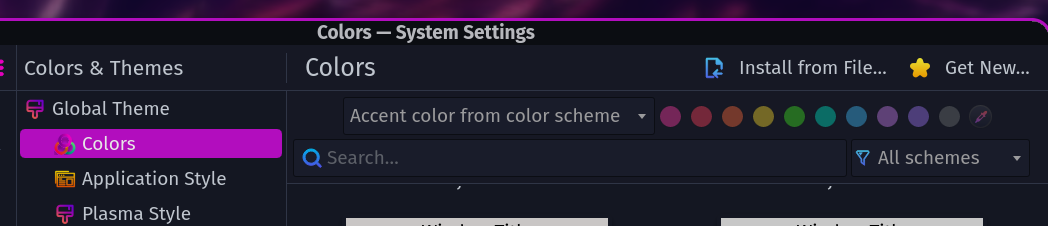
This feature interacts with various UI elements of the theme to provide whatever accent color you select.
Upon reloging the desktop, you may notice the color being reset to original Dr460nized theme. This is caused by Kvantum Manager. At this point, it seems Kvantum does not play well with Plasma Accent Color so when you login it overrides the previously selected color.
You will notice also with the Window Borders, which are controlled by the Desktop Effect Rounded-Corners. Since it uses the highlight color of the theme, the color is not set via Rounded-Corners, but via the theme itself. When you change that color with Accent Color, it changes the Window Borders’ color as well. That is until you relogin, because as explained above Kvantum then overrides the Accent Color and the borders of windows get the original Dr460nized color back.
This is the discussion on the Forum that led to identifying this behavior.
In parallel, that topic, although taken at a much wider level, has been brought up in 2022 on the Kvantum Github. According to the developper, Kvantum will never be compatible with any of Plasma Color Schemes’ features.